Journos News - Breaking News, World News, Top Stories, Todays Headlines and Flash Reports
Friday, October 9, 2026
  • Login
  • Home
  • World
    • Africa
    • Americas
    • Asia
    • Europe
    • Middle East
    • Oceania
  • Politics
  • Business
  • Technology
  • Health
  • Science
  • Sports
  • Entertainment
  • Culture
No Result
View All Result
  • Home
  • World
    • Africa
    • Americas
    • Asia
    • Europe
    • Middle East
    • Oceania
  • Politics
  • Business
  • Technology
  • Health
  • Science
  • Sports
  • Entertainment
  • Culture
No Result
View All Result
Journos News - Breaking News, World News, Top Stories, Todays Headlines and Flash Reports
No Result
View All Result
Home Technology Innovation & Emerging Technology

How to Keep Your Child’s Tablets and Laptops From Becoming Distractions From Schoolwork

Simple device settings and routines can reduce digital distractions during homework.

The Daily Desk by The Daily Desk
August 27, 2026
in Innovation & Emerging Technology, Technology
0
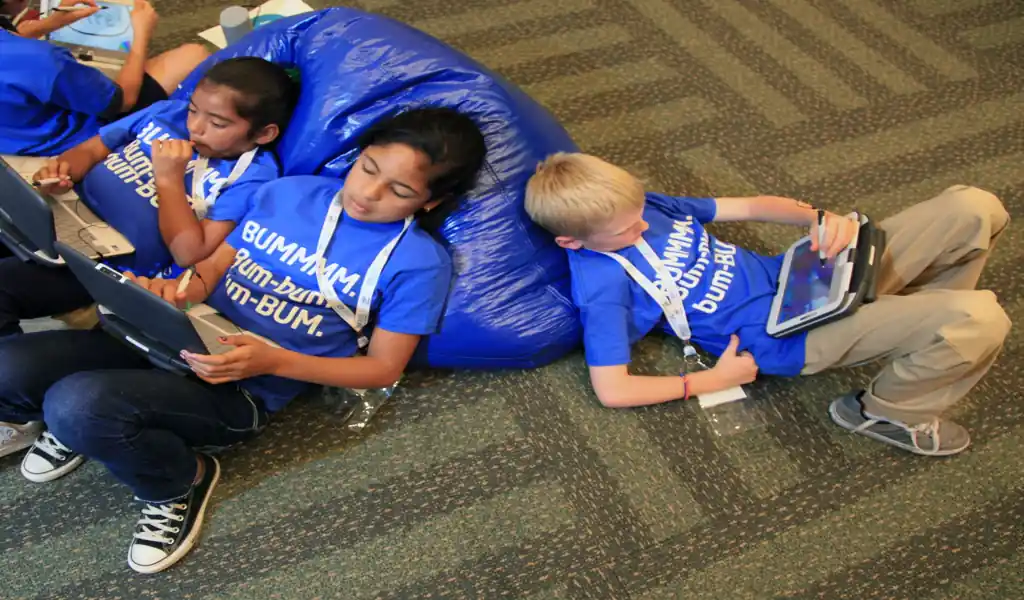
Children use tablet computers as part of school technology and digital learning activities.

Children use tablet computers as parents consider technology options for school, including tablets, laptops, and other educational devices.

NEW YORK – Tablets and laptops can be valuable tools for students, but the same devices used for assignments can also compete for a child’s attention through games, videos, social media, messaging and notifications.

The challenge for parents is not necessarily to keep children away from technology. It is to create a system in which schoolwork has a clear place and recreational screen use does not constantly interrupt it.

That starts with separating the device’s educational purpose from its entertainment features whenever possible.

Set clear rules before schoolwork begins

Children are more likely to follow technology rules when expectations are established before a disagreement occurs.

Parents can set simple rules covering when devices may be used for schoolwork, which applications are permitted and when entertainment becomes available.

For example, a household rule might be:

Schoolwork first. Entertainment after the assignment is finished.

The rules should be specific enough that children understand what is expected without requiring a new negotiation every time they open a device.

■ Related News

Laptop and smartphone display messages encouraging offline time, fewer notifications, outdoor activities, rest, and digital wellbeing during the weekend.

Weekend Digital Breaks Gain Attention as Workers Seek Relief From Constant Connectivity

September 13, 2026
Mobile phone displays the X app loading screen on a wooden desk beside a laptop and coffee mug.

Ireland Opens Formal Investigation Into X Over Child Access and Parental Controls

September 9, 2026
Thai Prime Minister Anutin Charnvirakul attends a press conference during an international conference on combating online scams in Bangkok.

Thailand PM Pledges Tighter Gun Laws After School Shooting

August 8, 2026
Official Meta company logo displayed on a white background, representing the parent company of Facebook, Instagram, WhatsApp, Messenger, and Threads.

Meta Ordered to Pay $567 Million as New Mexico Court Expands Child Safety Measures

August 7, 2026

Turn off unnecessary notifications

Notifications are one of the easiest ways for a device to interrupt concentration.

Messages, social-media alerts, game notifications and promotional reminders can pull a child away from an assignment even when the child did not intend to use those services.

Parents can help by enabling Do Not Disturb, Focus or similar settings during study periods.

Educational notifications that are genuinely necessary can remain available, while recreational alerts can wait until the study session ends.

Create a dedicated study environment

Where a child uses a device can influence how easily they concentrate.

A dedicated study area can help establish a mental distinction between schoolwork time and entertainment time.

If possible, the workspace should have limited distractions and enough room for books, notebooks and other materials.

For younger children especially, studying in a common household area can also make it easier for parents to provide support without constantly monitoring the screen.

Keep entertainment apps separate

If a child uses the same tablet or laptop for homework and entertainment, switching between the two can become effortless.

Parents can reduce that temptation by keeping recreational applications and websites separate from the child’s primary schoolwork environment.

Depending on the device, families may be able to use separate user accounts, parental controls or school-managed profiles.

The goal is not surveillance for its own sake. It is to make the desired behavior easier.

Use screen-time limits strategically

Screen-time controls can be useful, but they work best when they support an agreed household routine.

Parents can establish limits for recreational applications while allowing reasonable access to educational tools.

For example, a child might have unrestricted access to a school platform during homework hours while games and entertainment applications remain unavailable until later.

Parents should periodically review the settings because children’s schedules and school requirements change.

Teach children to manage distractions themselves

Technology rules are more effective when children eventually learn why those rules exist.

Parents can teach children to recognize common distractions:

  • checking messages repeatedly;
  • switching to entertainment websites;
  • opening unrelated browser tabs;
  • watching short videos between assignments;
  • playing games during study breaks; and
  • responding immediately to every notification.

The objective is to develop digital self-control, rather than making a child dependent on parental supervision.

Break assignments into manageable sessions

Long periods of uninterrupted homework can make distractions more tempting.

Breaking work into smaller sessions can give children clear goals and predictable opportunities to rest.

A child might work on one assignment for a set period, take a short break and then return to the next task.

During the work period, the device should be used only for the assignment.

The exact schedule can vary according to the child’s age, workload and attention span.

Keep phones away when they are not needed

A laptop or tablet may be necessary for an assignment, but a smartphone often is not.

If a phone is not required for schoolwork, placing it outside the immediate study area can remove another source of interruption.

This is especially useful when children receive frequent messages or social-media notifications.

Use parental controls as a support tool

Most major operating systems provide tools that allow parents to manage applications, screen time, content and purchases.

These controls can be particularly useful for younger children.

However, parental controls should complement conversations and household rules rather than replace them.

As children become more independent, parents can gradually shift responsibility toward the child.

Make breaks genuinely different from screen time

A study break does not necessarily need to involve another screen.

Walking, stretching, getting a drink, talking with family members or simply stepping away from the desk can give a child a clearer mental reset.

If every break involves opening a video platform or social-media application, a short break can easily turn into an extended distraction.

Watch for signs that the system is not working

Parents should look beyond the amount of time a child spends on a device.

Warning signs can include:

  • homework consistently taking much longer than expected;
  • frequent switching between schoolwork and entertainment;
  • difficulty stopping recreational screen use;
  • repeated arguments over device rules;
  • falling behind on assignments; or
  • a child being unable to concentrate without constant supervision.

These signs do not necessarily mean the child is misusing technology. They can indicate that the family’s current routine needs adjustment.

The goal is balance, not eliminating technology

Digital devices are now part of many children’s education. Trying to eliminate them completely may not be realistic or necessary.

The more useful approach is to establish boundaries that make the purpose of the device clear.

A tablet or laptop can be both a classroom and an entertainment center. The challenge is teaching children when it is one and when it is the other.

Parents can make that distinction easier by reducing notifications, separating school and recreational activities, creating predictable study routines and gradually teaching children how to manage their own digital distractions.

The long-term objective is not simply to get through tonight’s homework.

It is to help children develop the ability to use technology without allowing technology to control their attention.

Practical Checklist

  • Establish clear homework and entertainment rules.
  • Disable unnecessary notifications during study time.
  • Create a dedicated study space.
  • Separate educational and recreational applications where possible.
  • Use screen-time controls for entertainment.
  • Keep phones away when they are unnecessary.
  • Break long assignments into manageable sessions.
  • Encourage non-screen breaks.
  • Teach children how to recognize digital distractions.
  • Gradually give older children more responsibility for managing their screen use.

Reporting Credit: American Academy of Pediatrics — Family Media Plan and children’s media guidance; Common Sense Media — Family technology and screen-use guidance; U.S. Department of Education — student technology and digital learning resources.


Tags: #ChildDevelopment#DigitalLearning#DigitalWellbeing#Education#FamilyTechnology#OnlineSafety#Parenting#ScreenTime
The Daily Desk

The Daily Desk

The Daily Desk is the editorial byline of Journos News, representing reporting produced by the newsroom across world news, politics, business, technology, disasters, and other areas of public interest. Stories published under this byline are independently researched, verified, and edited in accordance with Journos News’ editorial standards, with an emphasis on accuracy, transparent sourcing, attribution, context, and editorial independence.

Related Posts

TikTok app icon displayed on the home screen of a smartphone for editorial illustration of the social media platform.

EU Says TikTok Failed to Adequately Protect Minors’ Privacy Under Digital Services Act

by The Daily Desk
July 25, 2026
0

BRUSSELS, Germany - The European Commission said Friday that TikTok failed to adequately protect the...

German prosecutors investigate an alleged Telegram-based sexual predator network. - AP Photo/Ebrahim Noroozi

German Prosecutors Uncover Telegram Predator Network That Used Code Words to Conceal Sexual Assaults

by The Daily Desk
July 11, 2026
0

BERLIN, Germany - German prosecutors say they have uncovered an organized network of sexual predators...

Facebook and Instagram logos amid European Union digital regulation enforcement - AP Photo/Tony Avelar, File

EU Orders Meta to Remove Addictive Facebook and Instagram Features Under Digital Services Act

by The Daily Desk
July 11, 2026
0

The European Union has accused Meta Platforms of violating its landmark Digital Services Act (DSA),...

Police investigate deadly shooting at Philippine high school campus - James Daantos via AP Photo

Philippine High School Shooting Leaves Three Dead as Two Students Detained

by The Daily Desk
June 22, 2026
0

MANILA, Philippines - Three students were killed and seven others wounded after two teenage students...

Malaysian family reacts to new social media age restrictionsHew Chee Weng, 11, uses smartphone in Kuala Lumpur, Malaysia, Monday, June 1, 2026 - AP Photo/Syawalludin Zain

Malaysia Enforces Under-16 Social Media Ban as Privacy and Enforcement Questions Persist

by The Daily Desk
June 1, 2026
0

Malaysia has begun enforcing a nationwide ban preventing children under 16 from holding social media...

Handwritten letters and envelopes displayed beside vintage stationery materials - AP Photo/Holly Ramer

Pen Pal Programs See Renewed Interest as Digital Fatigue Shapes Communication Habits

by The Daily Desk
June 16, 2026
0

As messaging apps and social media continue to dominate everyday communication, handwritten letters and pen...

Students browsing social media before college causing anxiety - Illustration by Leah Abucayan/CNN/Adobe

Incoming Class Social Media Trends Drive New Wave of Student Anxiety

by The Daily Desk
June 15, 2026
0

High school seniors are increasingly experiencing incoming class social media anxiety as universities’ unofficial Instagram...

Social media apps Instagram and YouTube displayed on smartphone screen - AP Photo/William Liang

Social Media Liability Ruling Signals Escalating Regulatory Pressure on Platform Design

by The Daily Desk
June 14, 2026
0

LOS ANGELES — A California jury’s decision holding Meta and YouTube liable for harms linked...

Meta logo representing child safety verdict and regulatory scrutiny - Jim Weber/Santa Fe New Mexican via AP, Pool

Meta Faces Escalating Regulatory Pressure After Jury Finds Child Safety Violations

by The Daily Desk
June 14, 2026
0

A New Mexico jury has concluded that Meta Platforms violated state law by harming children’s...

TikTok logo illustrating encryption policy debate- Getty Images/BBC

TikTok Encryption Strategy Deepens Data Governance Risk Debate

by The Daily Desk
June 14, 2026
0

TikTok’s encryption strategy has placed the platform at the center of a widening data governance...

Load More
Next Post
Donald Trump speaks at the Conservative Political Action Conference in Washington, D.C., in 2011 during a political address.

After Six Months of Iran War, U.S. Goals Have Shifted. Strait of Hormuz Is Now a Top Concern

U.S. Marines prepare for a reconnaissance patrol during a joint cold-weather military exercise in Burwash, Ontario, Canada.

Canada Bolsters Defense Industry as U.S. Relations Fray, Creating Boom for Local Contractors

RECOMMENDED

The Pentagon, headquarters of the U.S. Department of Defense, photographed from a commercial airliner in September 2018.

Pentagon to Livestream Nidal Hasan’s Scheduled Firing-Squad Execution

October 9, 2026
CCTV screenshot showing a mudslide at Gyirong Port during the 2026 Nepal floods, viewed downstream toward the south on August 26, 2026.

Nepal Ends Flood Search With 5,285 Still Missing as Families Seek Answers

October 7, 2026
District Court building in Perth, Western Australia, photographed on January 17, 2021.

Former Australian Bishop Christopher Saunders Sentenced for Abusing Indigenous Men

October 7, 2026
Participants attend the First International Congress for Women of Influence at the Summit Conference Hall in Tehran, Iran, on January 20, 2023.

Sri Lanka’s Former First Lady Shiranthi Rajapaksa Arrested in Graft Probe

October 7, 2026
PSO petrol pump on G.T. Road near Habib Abad in Pattoki tehsil, Punjab, Pakistan, photographed on August 23, 2012.

Pakistan Expands Fuel Subsidies to 9 Million as War Drives Up Energy Costs

October 7, 2026

MOST VIEWED

  • Map shows a reported boat collision near Ngombe-Lukolela on the Congo River in Équateur province, Democratic Republic of Congo.

    Congo River Boat Collision Kills at Least 30, Dozens Missing

    0 shares
    Share 0 Tweet 0
  • Lufthansa and Indian Airlines Suspend Riyadh Flights After Airport Explosions

    0 shares
    Share 0 Tweet 0
  • US Suspends Microsoft From Green Card Program Amid Alleged Fraud Probe

    0 shares
    Share 0 Tweet 0
  • Christa Pike Walks With Assistance and Eats After Failed Tennessee Execution

    0 shares
    Share 0 Tweet 0
  • Trump Signs Order Allowing Tax-Free Red-Dyed Diesel for Highway Use

    0 shares
    Share 0 Tweet 0
JournosNews logo

Journos News delivers globally neutral, fact-based journalism that meets international media standards — clear, credible, and made for a connected world.

  • Categories
  • World News
  • Politics
  • Business & Markets
  • Technology
  • Health
  • Science
  • Sports
  • Arts & Culture
  • Resources
  • Editorial Standards
  • Submit a Story
  • Advertise with Us
  • Syndication & Partnerships
  • Site Map
  • Press & Media Kit
  • Editorial Team
  • Careers

Join thousands of readers receiving the latest updates, tips, and exclusive insights straight to their inbox. Never miss an important story again.

  • About Us
  • Editorial & Trust Center
  • Contact Us
  • Privacy Policy
  • Terms of Use & Copyright Notice

© JournosNews.com All rights reserved.

Welcome Back!

Login to your account below

Forgotten Password?

Retrieve your password

Please enter your username or email address to reset your password.

Log In
JournosNews

Independent Journalism.
Verified Facts.

You're about to read a professionally edited article from JournosNews.com.

Every article is produced in accordance with our editorial standards, emphasizing factual accuracy, transparent attribution, fairness, editorial independence, and meaningful context.

Editorial Standards
No Result
View All Result
  • Home
  • World
    • Africa
    • Americas
    • Asia
    • Europe
    • Middle East
    • Oceania
  • Politics
  • Business
  • Technology
  • Health
  • Science
  • Sports
  • Entertainment
  • Culture

© JournosNews.com All rights reserved.

This website uses cookies. By continuing to use this website you are giving consent to cookies being used. Visit our Privacy and Cookie Policy.